


AVAX Blood Pressure Diary
4.4172.00 Reviews
App Specs
- Version
- 8.5.1
- Updated On
- License
- Free
- Downloads
- 500,000+
- Developer
- AVAX Health
- Categories
- Medical
- Platform
- Android
Screenshots
 Analysis by AppCompare
If you’re new to keeping a blood pressure record, the first useful thing to know is that a diary is only as helpful as the readings you enter. AVAX Blood Pressure Diary gives me a place to collect those numbers, add context, and look back at patterns instead of relying on memory. I’d treat it as a companion to a home monitor and conversations with a healthcare professional, not as a device that measures blood pressure or diagnoses a condition.
What to expect from a focused health diary
This is a medical tracking app from AVAX Health, built around recording blood pressure rather than replacing a general health record or a clinician’s advice. The app is free to install, with in-app purchases listed from $2.99 to $104.99 per item, so it makes sense to explore the basic workflow before deciding whether any paid option matters to you. Its Everyone age rating makes it suitable for a broad audience, though younger users should still involve a parent or guardian when handling health information.
The app has an average rating of 4.6 from around 10,000 ratings and has been installed over 500,000 times. That offers some reassurance that it has found an audience, but popularity alone can’t tell you whether its approach fits your habits. I’d judge it by a more personal test: can you enter a reading consistently, understand what you’re looking at, and bring a useful record to a medical appointment?
One practical boundary is worth keeping in mind from the start: a graph can show what you recorded, but it cannot explain why a reading changed or tell you what treatment to follow. If a result worries you, or you feel unwell, contact a healthcare professional rather than waiting for a trend line to make sense of it. That distinction lets the app do its useful job—organizing a record—without asking it to do more than a diary should.
The First Impressions
When I first opened the AVAX Blood Pressure Diary, I was immediately struck by its clean and intuitive design. No unnecessary clutter, just a straightforward interface that guides you through the process of logging your readings. For those of us who aren't exactly tech-savvy, this is a huge plus. I loved how everything was just a tap away, making it super easy to navigate.
Getting set up without overthinking it
My advice for a first session is to keep setup simple. Have your blood pressure monitor nearby, decide when you can take readings regularly, and enter only information you’re comfortable maintaining. The store identifies the current version as 8.4.5 and lists Android 8.0 as the minimum operating system; check that your device meets that requirement before installing. The app’s release date is December 31, 2018, and its German origin is a point of context, not a reason to assume that every instruction or health recommendation will match your clinician’s advice.
Before building a long record, make one test entry and check that the numbers and any note appear as you expect. This small check is especially useful if you’re helping a family member: it gives you a chance to confirm that the right person’s reading is being recorded and that you both understand the entry flow. If you use the app for more than one person, don’t assume it separates profiles unless you can see that option in your own version.
Worth Reading Before You Choose

Flipboard Shows What News Apps Must Do Beyond the Feed

Switching to Android Auto Means Rethinking Your Driving Routine

Google Calendar Makes a Crowded Week Easier to Manage

Ludo King Makes the Most of the Minutes Between Plans

Baby Panda World Brings Quick Play to Modern Phones, but Its Game Library Feels Busy

ESPN’s Live Game View Makes Following Close Games Easier
Making the first entry meaningful
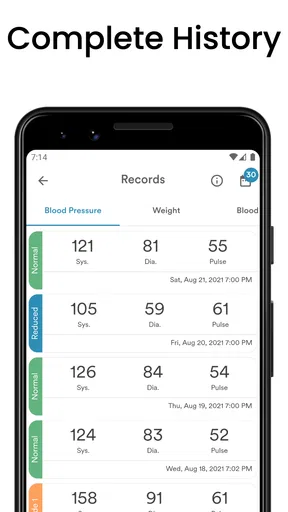
One of the key features is how effortlessly you can log your blood pressure readings. You simply enter your systolic and diastolic numbers and hit save. There's also a handy option to add notes, which is great for recording any other health info or symptoms you might be experiencing. Trust me, this little feature can be a lifesaver when you're discussing your health with your doctor.
For a useful first entry, I’d add a brief, neutral note only when it helps explain the circumstances—for example, that the reading was taken after a busy morning, or that you felt unusually tired. That context can make a later conversation more informative, but it shouldn’t become a substitute for following the measurement routine recommended by your clinician. Avoid turning the notes field into a stream of guesses about causes; clear observations are easier to review than conclusions made in the moment.
A realistic routine might be to take a reading at a time your care team has recommended, record it while the monitor is still beside you, and add a note only if something relevant stands out. Then you can return to your day without trying to remember the numbers hours later. The first success is not a perfect-looking chart; it’s a correctly saved entry that you can find again.
Turning entries into a readable history
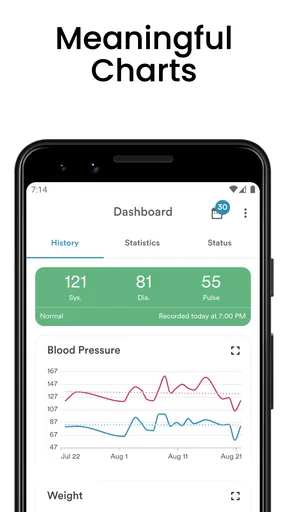
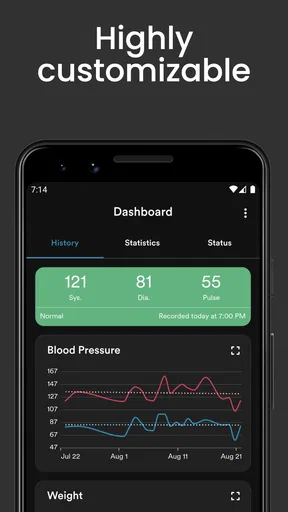
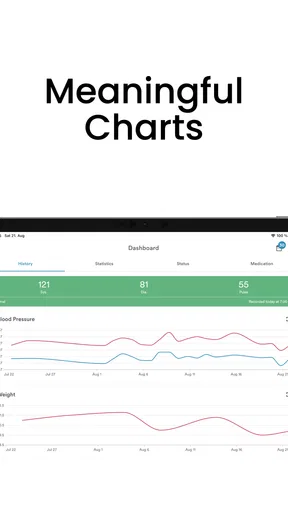
Now, what good is logging all these numbers if you can't track your progress, right? This is where the app really shines. The AVAX Blood Pressure Diary offers detailed graphs that show your blood pressure trends over time. It's pretty satisfying to see how your efforts are paying off, and it gives you a visual representation of your health journey. Plus, you can easily switch between daily, weekly, and monthly views.
The different time views are most useful when you have enough consistently recorded entries to compare. A single unusual result can dominate a short view, while a longer view may make a recurring pattern easier to notice. I’d use the graph to prepare questions—such as whether a change seems persistent—rather than to label a reading as good or bad on my own. Keeping the same measurement habits also makes comparisons more meaningful; changing when or how you take readings can make a chart harder to interpret.
This is where the app differs from a paper notebook: the visual history can make repeated values easier to scan, while paper may be more flexible for someone who wants to write longer observations or dislikes entering health information on a phone. A general notes app is another alternative, but it usually takes more effort to organize readings into a clear timeline. If you already have a monitor or health platform that reliably stores readings in a format you prefer, switching to another log may create duplicate work rather than improve your routine.
Using reminders without letting them run your day
Let’s be honest, we all have those days when we completely forget to check our blood pressure. Thankfully, the app has a built-in reminder system. You can set up notifications to remind you to take your readings at specific times, ensuring you never miss a check. It's like having a little nudge to keep you on track.
I’d choose a reminder time that fits the schedule you’ve been advised to follow, rather than turning on frequent prompts just because the option exists. A notification is helpful when it cues a planned measurement; it can become noise if it arrives when you can’t take a reading. If you miss one, don’t feel you need to compensate by taking extra readings unless your clinician has told you to. The point is to support a sustainable routine, not to make the app another source of pressure.
For someone who shares a household or has a variable workday, a reminder can be an especially useful cue, but the phone should not become the authority on how often to measure. Follow the schedule given to you by a healthcare professional. The app’s role is to help you remember and record that plan, not to set a medical schedule for you.
Preparing information to share
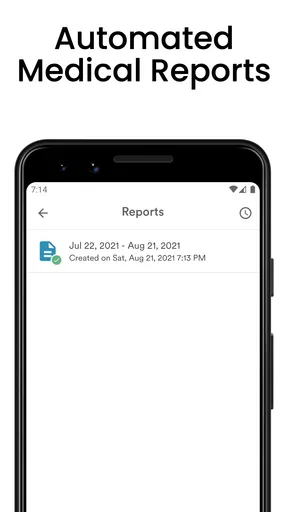
Another cool feature is the ability to export your data. With just a few taps, you can send your blood pressure history to your doctor or download it for your records. This is incredibly useful for those regular check-ups, making it easy to share comprehensive data with your healthcare provider.
Before an appointment, I’d review the record and make sure the period you want to discuss is represented by entries you trust. Exporting is most useful when you and your clinician have agreed that a written history will help; a file is not automatically clearer than a conversation, so be ready to explain your routine and mention any gaps. For a quick check-in, you may only need to bring the relevant summary rather than treating every saved reading as equally important.
If you’re unsure what an export contains or how it will be shared, inspect the options in the app before sending anything. Health records are personal, and it’s sensible to share only with the person or service you intend. I also wouldn’t assume that exporting means the app automatically sends information to a doctor; check the on-screen steps and choose deliberately.
Keeping the wider health picture in perspective
The app also includes a section for tracking your weight and body mass index (BMI), which is pretty neat if you're trying to get a full picture of your health. It's like having a mini health hub, all within one app. Plus, it offers insights and tips to help you manage your blood pressure better, which I found to be a nice touch.
Those extra records can be convenient if they’re already part of a routine you want to maintain, but I’d avoid adding every available metric just to make the diary feel more complete. BMI is a calculation, not a full assessment of health, and an app’s general tips should not override advice tailored to your circumstances. For a person who only needs a blood pressure log, the added sections may be useful but not essential; for someone who wants detailed nutrition, medication, or appointment management, this is not a complete substitute for a broader health platform.
There’s also a practical trade-off in keeping several kinds of health information together: it can make one app feel convenient, but it means you need to be deliberate about what you enter and what you later share. I’d keep notes factual and relevant, especially if exporting a record for a visit. That makes the diary easier to use and reduces the chance that a useful trend gets buried under unrelated details.
When the app fits—and when another choice is better
I see this app as a good fit for someone who has a home blood pressure monitor, has been asked to keep a record, and wants graphs, reminders, and a way to share entries without maintaining a handwritten log. It may also suit a first-time tracker who wants a clear place to start, provided they understand that the app records information they enter rather than taking the measurement itself.
I’d skip it if you need a blood pressure monitor built into your phone, automatic readings from a device you already own, or a detailed medical record that brings together appointments and treatment plans. I’d also choose paper if using a phone during a measurement is distracting or if you’re more likely to keep a notebook beside the monitor. The best option is the one you can use accurately and consistently, not the one with the most digital features.
One small but useful habit is to compare your saved entries with the monitor before an appointment, particularly if you often enter numbers later. Transposed digits can make a graph misleading, and a quick check is easier than trying to reconstruct a reading from memory. If you notice an entry mistake, correct the record if the app allows it; don’t leave a value you know is wrong just because it has already been saved.
Support, limits, and a sensible next step
Throughout my time using the app, I found the user experience to be smooth and responsive. If you ever run into issues, the support team is just an email away, and they’re super helpful. It’s nice to know that if you do hit a snag, there’s someone ready to assist.
As with any app, the experience can depend on how well it fits your phone and routine, so I’d start with the core task rather than trying to build an elaborate record immediately. The app is free to download, but its in-app purchases range from $2.99 to $104.99 per item; I’d check what a purchase covers and whether you actually need it before paying. The basic decision is simple: can you enter, revisit, and share readings in a way that helps you? If yes, you may not need to add anything else.
My next step would be to make a first entry, set a reminder only if it supports the schedule you’ve been given, and return after a few readings to see whether the history is easy to understand. If anything about the app’s interpretation or your results raises concern, take that question to a healthcare professional. That keeps the app in its strongest role: a practical organizer for your own record.
In conclusion, the AVAX Blood Pressure Diary is a fantastic tool for anyone looking to keep a close eye on their blood pressure. It's user-friendly, packed with useful features, and genuinely makes managing your health easier. Whether you're a tech enthusiast or someone who prefers simplicity, this app has something for everyone. So, why not give it a try and see how it can help you stay on top of your health goals?
Pros
- User-friendly interface for easy tracking
- Automatic data backup to the cloud
- Customizable reminders for measurements
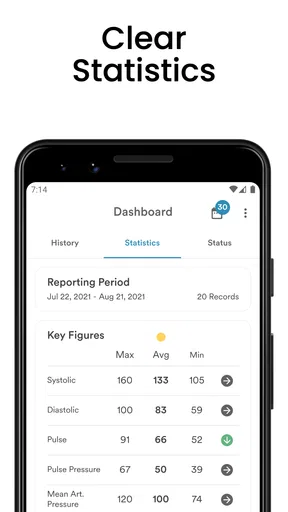
- Comprehensive data analysis tools
- Syncs with most smart blood pressure monitors
Cons
- Limited features in the free version
- Ads can be intrusive at times
- No integration with fitness apps
- Graphical reports could be more detailed
- Lacks real-time medical alerts
FAQs for AVAX Blood Pressure Diary
What features does AVAX Blood Pressure Diary offer to help manage my health?
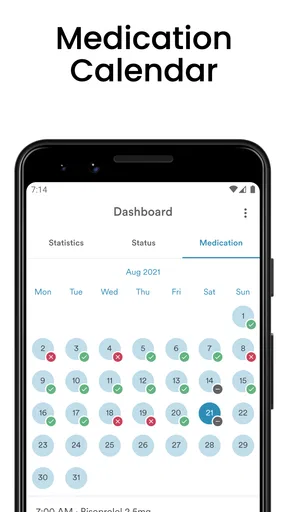
AVAX Blood Pressure Diary provides a comprehensive suite of features designed to help you track and manage your blood pressure effectively. These include daily logging, visual graphs to monitor trends over time, reminders for medication and check-ups, and the ability to export your data for sharing with healthcare professionals. It's user-friendly and designed with your health in mind.
Is the AVAX Blood Pressure Diary app available for both Android and iOS devices?
Yes, AVAX Blood Pressure Diary is available for download on both Android and iOS platforms. This ensures that regardless of your device preference, you can easily access and utilize the app's features to monitor your blood pressure and maintain your health records conveniently.
How secure is my data within the AVAX Blood Pressure Diary app?
Data security is a top priority for AVAX Blood Pressure Diary. The app employs encryption to safeguard your personal health information. Additionally, it offers options for password protection and biometric authentication to ensure that only you have access to your sensitive data, providing peace of mind.
Can I sync AVAX Blood Pressure Diary with other health apps or devices?
AVAX Blood Pressure Diary is designed to integrate seamlessly with various health apps and devices. It supports syncing with popular fitness trackers and health monitoring devices, allowing you to consolidate your health data in one place and gain a comprehensive view of your health metrics.
Does AVAX Blood Pressure Diary offer customer support if I encounter issues?
Yes, AVAX Blood Pressure Diary provides robust customer support to assist users with any issues or questions. You can access support through in-app messaging, email, or their official website. The support team is responsive and dedicated to ensuring you have the best possible experience with the app.


